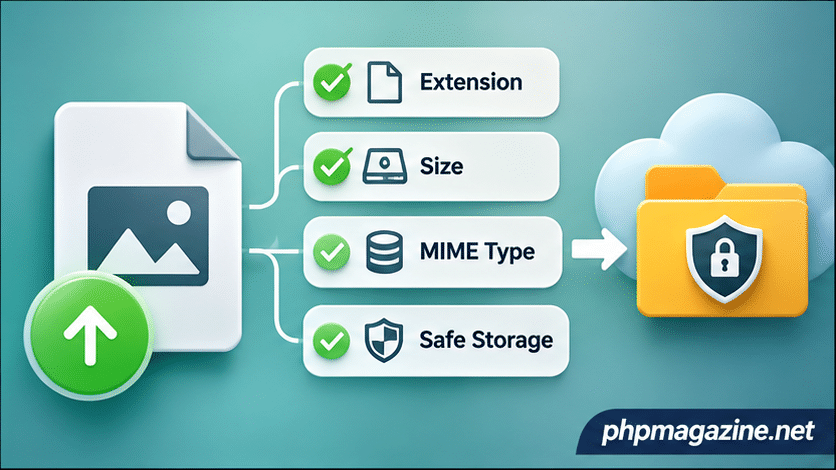
File uploads are among the most deceptively simple features in a web application. A profile picture, a document attachment, or an administrative media library may require only a few lines of PHP to accept a file. Securing that operation is a different matter.
The uploaded filename, declared content type, file size, and file contents all originate from an untrusted client. Treating any one of these values as proof that a file is safe can expose an application to unintended file execution, storage exhaustion, malicious downloads, or unauthorized access to private content.
PHP provides useful primitives for handling uploads, but application developers must establish the surrounding security policy. This tutorial builds a small image-upload pipeline for PHP 8.2 or later and explains what the code protects against—and what it does not.
The Browser Is Not a Security Boundary
A typical HTML form might restrict a file input to JPEG and PNG images:
The accept attribute improves the user experience, but it is not a server-side validation mechanism. A client can submit a manually constructed HTTP request containing any filename, declared MIME type, or content.
Likewise, the Content-Type associated with an uploaded file is not trustworthy merely because it appears in PHP’s $_FILES array.
Define a Narrow Upload Policy
Before writing code, decide what the application actually needs. Our example accepts one JPEG or PNG image, limits the upload to two megabytes, generates its own filename, and stores the result outside the public web directory.
It intentionally excludes SVG, which can contain active content, and does not attempt to accept arbitrary documents. Broader file support requires a broader threat model.
A Practical PHP Upload Handler
The following example assumes that the authenticated user is authorized to upload an image and that a private storage directory already exists. Authentication, authorization, CSRF protection, and directory provisioning must be implemented separately.
 MAX_UPLOAD_BYTES
    ) {
        throw new RuntimeException(
            'Invalid file size.'
        );
    }

    $temporaryPath = $file['tmp_name'];

    if (
        !is_string($temporaryPath) ||
        !is_uploaded_file($temporaryPath)
    ) {
        throw new RuntimeException(
            'Invalid upload source.'
        );
    }

    $finfo = new finfo(FILEINFO_MIME_TYPE);
    $mime = $finfo->file($temporaryPath);

    $allowed = [
        'image/jpeg' => 'jpg',
        'image/png' => 'png',
    ];

    if (
        !is_string($mime) ||
        !isset($allowed[$mime])
    ) {
        throw new RuntimeException(
            'Unsupported file type.'
        );
    }

    if (!is_dir(PRIVATE_UPLOAD_DIR)) {
        throw new RuntimeException(
            'Storage is unavailable.'
        );
    }

    $filename = bin2hex(random_bytes(16))
        . '.'
        . $allowed[$mime];

    $destination = PRIVATE_UPLOAD_DIR
        . DIRECTORY_SEPARATOR
        . $filename;

    if (!move_uploaded_file(
        $temporaryPath,
        $destination
    )) {
        throw new RuntimeException(
            'Unable to store upload.'
        );
    }

    return $filename;
}

try {
    if (
        !isset($_FILES['photo']) ||
        !is_array($_FILES['photo']) ||
        is_array($_FILES['photo']['error'] ?? null)
    ) {
        throw new RuntimeException(
            'Expected one uploaded file.'
        );
    }

    $storedName = storeImageUpload(
        $_FILES['photo']
    );

    echo 'Upload accepted.';
} catch (RuntimeException $exception) {
    http_response_code(400);
    echo 'Upload rejected.';
}
The example returns a generated storage name internally but does not expose the private file path to the client. In a real application, the stored name would usually be associated with an authorized user or domain entity in a database.
Why These Checks Matter
The first check verifies PHP’s upload error code. This distinguishes a completed upload from requests rejected by PHP’s own limits or interrupted during transfer.
The size check enforces the application’s two-megabyte policy. PHP’s upload_max_filesize and post_max_size settings remain important because they limit requests before application code processes them.
The Fileinfo extension inspects file content to determine a likely MIME type. It is more meaningful than trusting a browser-supplied MIME string, but it is not a malware scanner or a guarantee that a complex file is harmless.
The random filename prevents the client from choosing the destination name and makes accidental collisions highly unlikely. This also avoids relying on sanitization of potentially hostile filenames.
Finally, move_uploaded_file() checks that its source is a valid PHP HTTP upload. It does not establish that the contents are safe; that is why the other controls remain necessary.
Private Storage Is More Important Than the Filename
Saving uploaded files directly inside a publicly executable directory creates unnecessary risk. A server misconfiguration may allow an uploaded script or unexpected file type to be interpreted rather than downloaded.
Storing uploads outside the document root provides a stronger boundary. Authorized application endpoints can retrieve files after checking ownership and permissions, while the web server cannot simply expose them through predictable public paths.
If public media delivery is required, use a dedicated storage or serving strategy that prevents script execution and supplies controlled response headers.
MIME Detection Is Not Full Image Validation
There is an important limitation in our example: Fileinfo classification does not prove that an image is structurally valid or safe for every downstream decoder.
Applications that resize or transform images should use a maintained image-processing library, apply pixel-dimension and resource limits, and consider decoding and re-encoding accepted images. Such processing can remove unwanted metadata, but the decoder itself becomes another component that must be maintained and secured.
For higher-risk systems, malware scanning, quarantine, and asynchronous processing may be justified. The right controls depend on the file types, audience, and consequences of compromise.
Test Rejection Paths, Not Just Successful Uploads
Security testing should include an oversized file, an empty file, a mismatched MIME declaration, a renamed script, a malformed image, and an attempt to submit multiple files to an endpoint expecting one.
Also verify that rejected uploads are not retained, that private files cannot be accessed without authorization, and that application logs do not expose sensitive filesystem paths to users.
A secure upload feature is not one validation function. It is a chain of decisions covering acceptance, storage, processing, access, and eventual deletion. PHP supplies the mechanisms; the application must enforce the policy consistently.
October 2026: A Real-World Warning
The October 2026 compromise of the npm package “@subql/common” illustrates an important limitation of trusted publishing. A malicious release can originate from an apparently legitimate publishing workflow. Version 5.8.3 reportedly contained credential-stealing code, demonstrating why provenance must be evaluated alongside build integrity, workflow security, dependency review, and runtime behavior.
A signed or traceable artifact is not necessarily a safe artifact.
Related
php-file-upload-security-building-a-safer-upload-pipeline